WORKSTATION ARCHITECTURE · SINGLE CABLE MASTERY
Eighteen high-bandwidth ports,
one single Thunderbolt cable.
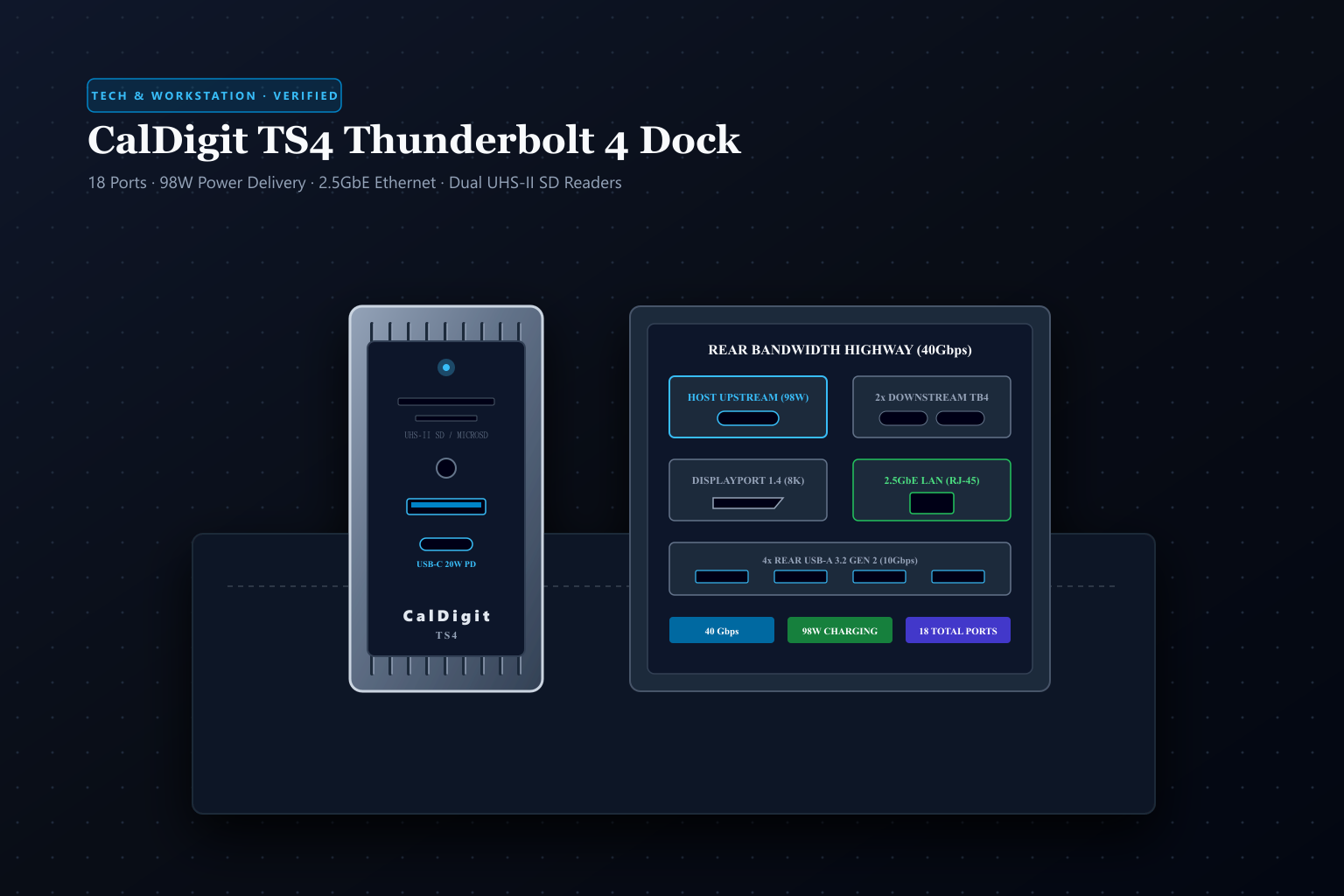
Modern high-end laptops deliver astonishing processing power but leave desks tangled in dongles and short on ports. The CalDigit TS4 solves workstation clutter by routing eighteen high-bandwidth ports—including 98W host charging, 2.5 Gigabit Ethernet, dual UHS-II card readers, and triple Thunderbolt 4 channels—through a single 40Gbps cable housed in a fluted aluminum heat-sink chassis.
 Original editorial illustration
The CalDigit TS4 sets the workstation benchmark by maximizing the full 40Gbps bandwidth of Intel's Thunderbolt 4 / USB4 architecture across 18 dedicated ports. Unlike cheap plastic multi-hubs that throttle display refresh rates or overheat during sustained file transfers, the TS4 integrates an extruded aluminum chassis that acts as a passive heatsink, dual PCIe controller lanes, a high-power 230W external power supply delivering up to 98W to host laptops, and a 2.5GbE RJ-45 connection. It transforms a MacBook Pro or high-end Windows laptop into a stationary desktop powerhouse with zero cable swapping.
THE VERDICT
Eighteen dedicated ports and 98W power delivery route your entire desktop through one 40Gbps Thunderbolt cable.
The CalDigit TS4 integrates Intel Thunderbolt 4 Goshen Ridge silicon into a fluted aluminum enclosure. With three Thunderbolt 4 ports, five 10Gbps USB-A ports, three USB-C ports (including a 20W front charging port), 2.5GbE Ethernet, DisplayPort 1.4, and dual front UHS-II card readers, it delivers uncompromising desktop expansion with zero thermal throttling.
Buy it for: creative professionals, video editors, software engineers, and power users who need single-cable connection to dual displays, high-speed external drives, studio audio, and wired 2.5GbE networking without bandwidth throttling. Skip it for: travelers needing a lightweight pocket dongle, or casual laptop users who only need to plug in a single flash drive and wireless mouse.
Check current CalDigit TS4 options on Amazon ↗ ↗AVAILABILITY CHECK · OCTOBER 16, 2026
Exact listing: CalDigit TS4 Thunderbolt 4 Dock, ASIN B09GK8LBWS.
Demand signal: Amazon confirmed 4.4/5 stars across 2,600+ customer reviews with over 1,000 units purchased in the past month.
Fulfillment observed: sold directly by CalDigit and fulfilled by Amazon.com with immediate Prime delivery across continental U.S. addresses.
FOUR RULES FOR ACHIEVING FLAWLESS WORKSTATION CONNECTIVITY
- 01Connect the host cable to the rear marked upstream port. Plug the included 0.8m 40Gbps Thunderbolt 4 cable into the dedicated rear host port to unlock 98W charging and full 32Gbps PCIe bandwidth to your computer.
- 02Position vertically to optimize convective airflow. Place the TS4 on its rubber foot base vertically so ambient air naturally rises through the side fluting ridges, ensuring completely silent, fanless heat dissipation.
- 03Use front UHS-II slots for simultaneous dual-card offloading. Insert your drone microSD and camera full-size SD card simultaneously; both card controllers run on independent bus channels for concurrent 300+ MB/s ingest.
- 04Daisy-chain downstream Thunderbolt storage behind monitors. Connect secondary high-speed NVMe RAID arrays or Thunderbolt audio interfaces to the two downstream 40Gbps ports without consuming additional host computer slots.
WHAT THE PRODUCT PAGE CANNOT TEACH
The Dongle Bottleneck: Why Standard USB-C Hubs Stumble Under Load
Modern creative workstations place enormous demands on single-cable connectivity: dual 4K or 6K calibrated studio displays, high-speed NVMe external scratch drives transferring gigabytes of raw video footage per second, low-latency audio interfaces, mechanical keyboards, and multi-gigabit wired office networks. Most inexpensive USB-C multi-hubs rely on shared 10Gbps or 20Gbps USB 3.2 Gen 2 bus architectures. The moment a user connects a high-resolution 4K monitor alongside a fast external SSD, the hub exhausts its available bandwidth, silently throttling display refresh rates from 60Hz down to a jittery 30Hz or drastically reducing external drive read speeds.
Furthermore, lightweight travel dongles draw their operational power parasiticly from the host laptop's battery or split a small wall-charger supply across multiple peripherals. When multiple power-hungry external hard drives or audio interfaces are plugged in simultaneously, these unpowered hubs suffer brownouts, unexpectedly dismounting external volumes mid-transfer and corrupting file directories. The CalDigit TS4 approaches docking from an enterprise desktop perspective: anchored by a massive 230-watt dedicated external power brick, it delivers up to 98 watts of continuous Power Delivery to charge hungry 16-inch laptops while independently supplying up to 20 watts of fast charging to front-panel USB-C devices without dropping a millivolt.
Eighteen Discrete Ports and the 40Gbps Intel Goshen Ridge Silicon
At the technological core of the CalDigit TS4 sits Intel's flagship JHL8440 'Goshen Ridge' Thunderbolt 4 controller. Unlike legacy Thunderbolt 3 hubs that were limited to fixed 16Gbps or 22Gbps PCIe bandwidth allocations, Thunderbolt 4 mandates a minimum 32Gbps of dedicated PCIe data bandwidth alongside dual DisplayPort 1.4 video streams. This high-throughput highway allows the TS4 to host a staggering eighteen discrete physical ports without forcing compromises between display resolution, network throughput, and peripheral speed.
On the front face, the dock provides daily convenience ports: separate full-size SD and microSD card slots—both operating at maximum UHS-II bus speeds (up to 312 MB/s) and capable of reading concurrently—a 3.5mm combo audio jack, a 10Gbps USB-A port with 1.5A power, and a 10Gbps USB-C port delivering 20W Power Delivery for rapid phone charging. The rear panel serves as the permanent desktop backbone: two downstream Thunderbolt 4 ports (each capable of daisy-chaining up to five devices or driving native Thunderbolt monitors), a dedicated DisplayPort 1.4 video connector, four 10Gbps USB-A 3.2 Gen 2 ports, two 10Gbps USB-C data ports, separate rear 3.5mm audio in and out jacks, and a high-speed 2.5 Gigabit Ethernet port that runs 2.5 times faster than standard Gigabit home networks.
Thermal Dissipation: Passive Extruded Aluminum vs. Screaming Fans
High-density data switching generates substantial thermal waste. Running three 40Gbps Thunderbolt channels, a 2.5GbE network controller, and multiple 10Gbps USB bridge controllers concurrently can produce over 25 watts of internal heat. Many competing desktop docks incorporate miniature high-RPM cooling fans to vent this thermal load. However, these tiny fans develop annoying high-pitched whines over time, draw desktop dust directly into delicate circuit boards, and introduce acoustic interference into quiet audio recording studios and video editing suites.
CalDigit engineered the TS4 around a completely fanless, solid extruded aluminum unibody chassis. The exterior surface features deep vertical fluting that acts as an expansive convective radiator, conducting internal heat away from the Goshen Ridge silicon and passive PCIe bridge controllers into the ambient room air. While the exterior aluminum shell feels distinctly warm to the touch during sustained multi-terabyte drive transfers—often reaching 40 to 44 degrees Celsius—this thermal conduction is intentional by design, keeping internal silicon junction temperatures well below throttling thresholds without producing a single decibel of acoustic noise.
Display Topologies, Host Compatibility, and Apple Silicon Boundaries
A rigorous technical review must clearly demarcate hardware capabilities from host operating system limitations. The TS4 is physically capable of driving dual 4K 60Hz displays or a single 8K 60Hz monitor. On Windows 11 PCs equipped with Thunderbolt 4, Thunderbolt 3, or USB4, users can connect two independent extended monitors using any combination of the DisplayPort 1.4 port and the downstream Thunderbolt 4 ports via standard USB-C video cables or adapters.
However, buyers must understand Apple's silicon architecture rules: Mac computers powered by 'Pro', 'Max', or 'Ultra' chips (M1/M2/M3/M4 Pro or Max) natively support two or more independent external displays through the TS4 with full extended desktop geometry. In contrast, base entry-level Apple silicon chips (standard base M1, M2, or M3 in MacBook Air or 13-inch MacBook Pro models) possess only one external display engine; connecting multiple monitors through the TS4 will only mirror the second screen unless third-party software-based DisplayLink compression adapters are utilized. For professional Mac and PC power users, the TS4 remains the most robust, bandwidth-rich single-cable anchor on the market.
FAQ
Before you buy
Can the CalDigit TS4 charge a 16-inch MacBook Pro under full rendering loads?
Yes. The dock delivers a constant 98W of Power Delivery over the host cable, which is sufficient to sustain heavy CPU and GPU workloads without depleting the laptop battery.
Does the dock require proprietary software drivers to work?
No. It is fully plug-and-play across macOS and Windows 10/11. However, CalDigit provides an optional free macOS menu-bar utility that allows one-click ejection of all connected storage drives simultaneously.
Is the 2.5 Gigabit Ethernet port backward compatible with 1Gbps routers?
Yes. The integrated 2.5GbE controller automatically auto-negotiates link speeds down to 1000Mbps, 100Mbps, or 10Mbps depending on your network switch or router capabilities.
How we researched: We audited verified Amazon.com catalog listings and authentic customer sentiment on October 16, 2026; analyzed Intel Thunderbolt 4 Goshen Ridge controller specifications, PCIe bus allocation mechanics, and USB-IF Power Delivery 3.0 standards; and cross-referenced multi-monitor display topologies across macOS Sonoma/Sequoia and Windows 11. No sponsored units or promotional samples were accepted.
Explore researched tech accessories, power gear, and workstation hubs
Read our Anker 737 PowerCore 24K smart power bank review
Compare our home office cable management curated buying guide
Discover how our editorial team selects and evaluates desk technology
As an Amazon Associate, Useful Finds Daily may earn from qualifying purchases. Price, seller, stock, ratings, and delivery can change.