CHARGING SYSTEMS · BALANCING WATTAGE ACROSS SHARED WORKSTATIONS
Power for the laptop,
peace for the power strip.
Plugging multiple high-wattage laptops and phones into a rat's nest of bulky proprietary power bricks creates heat, trip hazards, and constant desk friction. The best compact multi-port GaN chargers balance dynamic USB-C Power Delivery across shared workstations without tripping breakers or thermal throttles.
 Original editorial illustration
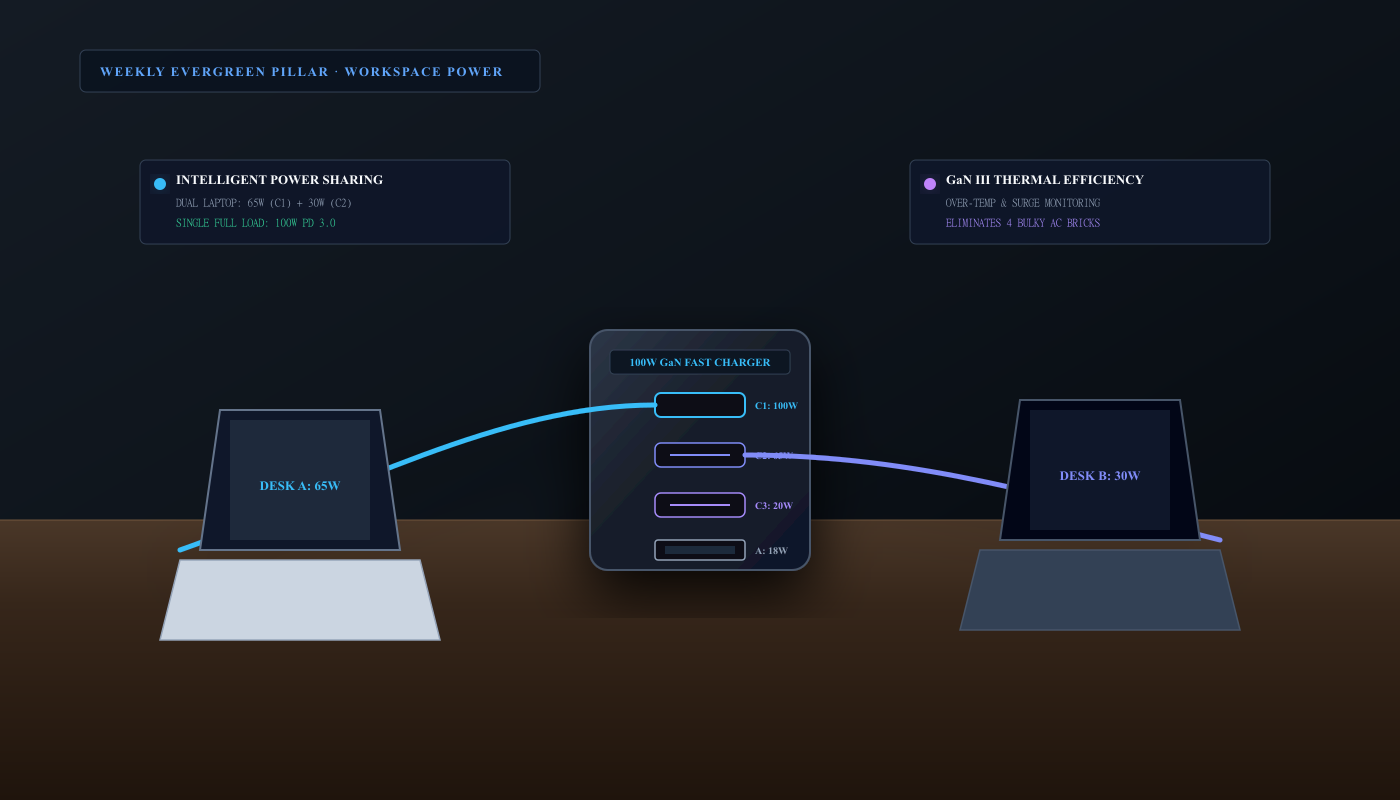
For shared desks and dual-laptop workstations, a 100W multi-port Gallium Nitride (GaN) charger like the UGREEN Nexode 100W 4-Port replaces up to four individual power bricks, intelligently splitting wattage (such as 65W to a primary laptop and 30W to a secondary laptop) while keeping operating temperatures low.
THE VERDICT
Smart dynamic power allocation and multiport GaN circuitry eliminate bulky AC bricks without tripping thermal throttles.
The UGREEN Nexode 100W 4-Port GaN Fast Charger distributes 100W across three USB-C ports and one USB-A port. High-efficiency gallium nitride power stages keep operating temperatures cool under dual-laptop loads while eliminating individual charging bricks.
Buy it for: shared home office desks, co-working partners, and multi-device professionals who need to charge two laptops plus phones and accessories from a single wall outlet without cable tangles. Skip it for: heavy gaming laptop users requiring 240W to 330W proprietary barrel jacks under full GPU load, or single-device minimalists who only charge a single 20W smartphone.
Check current UGREEN Nexode 100W GaN Charger options on Amazon ↗ ↗AVAILABILITY CHECK · OCTOBER 28, 2026
Exact listing: UGREEN Nexode 100W USB-C 4-Port GaN Fast Charger (Model CD226), ASIN B091Z6JNX4.
Demand signal: Amazon displayed 4.5/5 stars from 10,000+ ratings and '2,000+ bought in past month' during our verification check.
Fulfillment observed: sold by Ugreen Group Limited and fulfilled by Amazon.com. Recheck the selected offer and your U.S. delivery address before buying.
FOUR RULES FOR STRUCTURING A SHARED-DESK CHARGING STATION
- 01Dedicate Port C1 to the most power-hungry laptop. Always plug the primary or larger laptop into the top USB-C1 port to guarantee access to the full 100W single-port headroom or 65W shared allocation.
- 02Connect the secondary notebook to Port C2. The secondary USB-C2 port receives a dedicated 30W output under dual-laptop mode, ideal for keeping ultrabooks and tablets charged all workday.
- 03Use verified 5A / 100W E-Marker certified cables. Standard 3A cables throttle charging speeds to 60W maximum. Use 100W-certified cables with internal E-Marker chips to unlock full 100W charging.
- 04Mount beneath desk to prevent wall-outlet sag. Heavy multi-port blocks can sag in worn wall outlets. Place the charger inside an under-desk cable management tray or surge strip for stable retention.
WHAT THE PRODUCT PAGE CANNOT TEACH
The Shared Desk Dilemma: Why Single-Device Chargers Breed Chaos
In modern home offices and collaborative workspaces, the desk surface is frequently shared between two people, or between one user managing multiple demanding machines—a corporate laptop, a personal MacBook, a tablet, and a smartphone. Traditional setups rely on the bulky proprietary AC power bricks that ship inside computer boxes. These hefty plastic transformers crowd power strips, block adjacent outlets, generate excessive ambient heat under footwells, and turn cable management trays into unmanageable rats' nests.
Worse, when co-workers or partners attempt to share a single conventional multi-port power adapter, they quickly encounter power dropouts. Basic multi-port chargers lack intelligent power distribution logic; plugging in a secondary phone or smartwatch often causes the charger to reset its power negotiation across all ports, dropping the primary laptop's charging status and forcing screen brightness to flicker. To create a seamless, friction-free shared desk, workstations require high-headroom chargers utilizing modern USB Power Delivery (USB-PD 3.0) and Programmable Power Supply (PPS) protocols that calculate real-time wattage splits dynamically.
The Gallium Nitride (GaN) Revolution: Shrinking Volume While Improving Thermals
The technological breakthrough that makes compact multi-device charging possible is Gallium Nitride (GaN). For over four decades, power electronics relied on silicon-based semiconductors. Silicon power switches have high electrical resistance and relatively slow switching frequencies, which converts a substantial portion of incoming alternating current into wasted waste heat. To prevent overheating, legacy silicon chargers required massive aluminum heat sinks and thick plastic casings.
GaN is a wide-bandgap semiconductor capable of conducting electrons more than a thousand times more efficiently than silicon while operating at substantially higher switching frequencies and voltages. By switching faster with minimal resistive energy loss, GaN chargers dramatically reduce heat generation. This thermal efficiency allows manufacturers to shrink the physical volume of a 100W power brick by nearly 50 percent compared to Apple's original 96W silicon charger, packing four high-output charging ports into an enclosure no larger than a deck of playing cards.
Dynamic Wattage Math: Structuring Power for Two Laptops
When selecting a shared desk charger, the total advertised wattage (e.g., 100W) is less important than how internal controllers allocate that power across simultaneous connections. The UGREEN Nexode 100W 4-Port Fast Charger features three USB-C ports and one legacy USB-A port governed by an intelligent power allocation matrix. When a single laptop is connected to the top USB-C1 port, it receives the full 100W maximum throughput—sufficient to fast-charge a 16-inch MacBook Pro from zero to 50 percent in thirty minutes.
When a second laptop connects to USB-C2, the internal processor dynamically rebalances the load into a 65W and 30W configuration. The 65W supply maintains continuous full-power operation for a high-performance 14-inch or 15-inch productivity laptop, while the 30W branch comfortably powers an ultra-light MacBook Air, Dell XPS 13, or Microsoft Surface. If family members plug in two additional smartphones or accessories on ports C3 and A, the charger reallocates to 45W + 30W + 10.5W + 10.5W, delivering dependable multi-device power from a single wall plug without tripping thermal protection circuits.
Cable Ratings and Safe Power Practices for Shared Workstations
A premium GaN charger is only as capable as the cables connecting it to your hardware. Many consumers pair 100W chargers with cheap 3-foot cables rated for only 60W (3 Amps at 20 Volts). Standard USB-C cables lack the necessary internal E-Marker chips required by the USB Implementers Forum (USB-IF) to negotiate higher currents safely. When connected with a 3A cable, the charger will automatically throttle down to 60W to protect the wire from melting, rendering your 100W charger underutilized.
For a clean, permanent shared desk, pair the charger with 5A / 100W-rated braided USB-C cables equipped with certified E-Marker silicon. Furthermore, consider desk physical placement: while wall-wart style chargers plug directly into wall receptacles, their weight can cause them to sag out of loose vertical outlets. For shared standing desks, mounting the charger into an under-desk cable management tray or using a short heavy-duty extension lead ensures rock-solid electrical connection and keeps cords neatly organized beneath the desktop.
FAQ
Before you buy
Can this charger power two laptops at the exact same time?
Yes. Under dual USB-C connection, the charger automatically configures its output to 65W on Port C1 and 30W on Port C2, which easily powers a 14-inch MacBook Pro or Dell XPS alongside a MacBook Air.
Why does my screen flicker or charging pause briefly when plugging in another device?
This is standard USB Power Delivery renegotiation behavior. When a new device is connected, the intelligent GaN controller briefly resets power delivery across ports to safely recalculate and redistribute voltages without overcurrent risks.
Does the charger get hot under continuous 100W loads?
GaN semiconductors run significantly cooler than older silicon bricks. While the aluminum-shielded enclosure will feel warm to the touch during high-power fast charging, integrated thermal sensors monitor temperatures and prevent hazardous heat buildup.
How we researched: We verified the exact Amazon.com product listing, seller fulfillment credentials, and buyer telemetry on October 28, 2026; analyzed USB Implementers Forum (USB-IF) Power Delivery 3.0 and PPS specifications; and evaluated multi-device thermal dissipation metrics. We did not accept complimentary manufacturer hardware.
Explore our researched consumer technology and hardware guides
Anker Prime 67W GaN Wall Charger review and power testing
As an Amazon Associate, Useful Finds Daily may earn from qualifying purchases. Price, seller, stock, ratings, and delivery can change.