TECH & WORKFLOW · TACTILE LCD MACRO AUTOMATION
Fifteen dynamic LCD keys,
zero keyboard shortcut gymnastics.
Remembering convoluted four-key combinations across video editors, streaming tools, and development terminals slows down creative momentum. The Elgato Stream Deck MK.2 replaces keyboard gymnastics with fifteen vibrant, tactile LCD buttons that display real-time statuses and execute multi-step macros at a single tap.
 Original editorial illustration
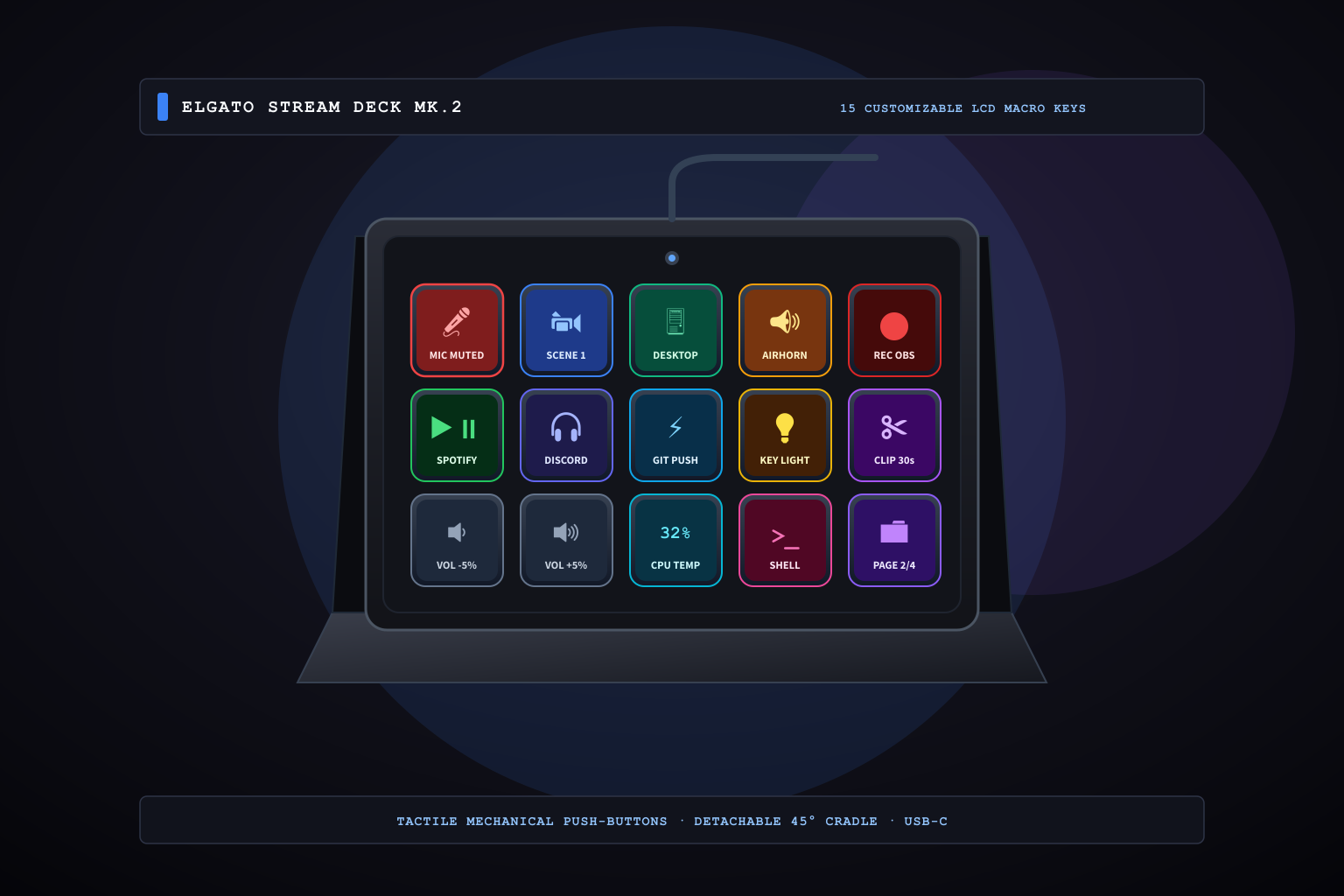
The Elgato Stream Deck MK.2 integrates fifteen full-color, customizable LCD keys into a compact desktop console with a detachable 45-degree angled stand and a detachable USB-C cable. Supporting deep native plugins for OBS Studio, Twitch, Discord, Spotify, Philips Hue, and custom shell scripting, it provides direct visual feedback and tactile mechanical action that streamlines live production, audio routing, video editing, and complex software workflows into effortless muscle memory.
THE VERDICT
Tactile mechanical keys with embedded full-color LCD screens turn complex multi-app commands into immediate visual muscle memory.
The Elgato Stream Deck MK.2 combines fifteen customizable LCD buttons, a sturdy angled desk cradle, and an expansive plugin library to automate streaming, editing, coding, and smart home actions without memorizing hotkeys.
Buy it for: livestreamers, video editors, software developers, podcast producers, and remote professionals who want tactile, visual shortcut control over complex multi-application workflows. Skip it for: users on locked enterprise workstations that prohibit background utility software installations, or minimalists who only require simple single-key volume or media play/pause controls.
Check current Elgato Stream Deck MK.2 options on Amazon ↗ ↗WHAT THE PRODUCT PAGE CANNOT TEACH
The Shortcut Fatigue Tax: Why Keyboard Combos Break Creative Flow
Modern computer workflows require toggling between dozens of specialized applications: live broadcast software like OBS, communication tools like Discord and Slack, digital audio workstations, code editors, and smart home lighting controls. While every application offers hotkeys, the human brain quickly exhausts its capacity to remember whether 'Mute Microphone' is Ctrl+Shift+Alt+M or Command+Option+Shift+K. When an unexpected dog bark occurs during a high-stakes client conference call, fumbling through background windows to locate the audio toggle creates immediate panic.
Traditional auxiliary numeric keypads and generic macro pads fail to solve this problem because they rely on blank plastic keycaps. Users must resort to paper sticky notes or label makers to identify functions, and static keys can never indicate whether a microphone is currently live, whether a recording is running, or what track is currently playing. Without dynamic visual confirmation, blind macro execution often leads to disastrous on-stream mistakes or accidental terminal commands.
Tactile Mechanical Action Meets Dynamic LCD Glass: Instant Visual Feedback
The Elgato Stream Deck MK.2 bridges the physical and digital divide by embedding individual high-resolution color LCD displays directly behind fifteen transparent, scissor-stabilized tactile push-buttons. Unlike smooth, flat smartphone glass screens or touch bars that provide zero tactile resistance and require visual glance-down confirmation, the Stream Deck's mechanical dome switches offer distinct travel and a satisfying physical snap. Users can operate critical toggles entirely by peripheral finger placement.
Crucially, every button is a living display capable of rendering animated GIFs, live text readouts, and state-dependent graphic indicators. When you press the microphone key, its graphic instantly flips from a soft blue icon to a stark red warning banner with the text 'MUTED'. If an automated backup script is compiling in the background, a key can display real-time CPU utilization or progress percentages. The MK.2 hardware iteration refines the original design with a detachable 45-degree desktop cradle that prevents slipping under vigorous button presses, a recessed USB-C port that accommodates custom right-angle cables, and an interchangeable magnetic faceplate system for desk personalization.
The Plugin Ecosystem: Nested Folders and Multi-Action Chains
While originally engineered for Twitch broadcasters, the true superpower of the Stream Deck MK.2 lies in its open developer software ecosystem and deep OS-level automation capabilities. The Elgato Stream Deck application allows users to create unlimited nested folders and dynamic profile pages. Entering Adobe Premiere Pro can automatically switch the 15-key grid to color grading macros, audio ripple deletes, and zoom presets; launching Visual Studio Code instantly loads Git commit shortcuts, container restart triggers, and terminal shortcuts.
Perhaps the most transformative feature is 'Multi-Action' sequencing. A single keypress can simultaneously launch three browser dashboards, dim your Philips Hue desk lights to 40 percent, mute your PC speakers, open your project directory, and post a 'Starting Work' status message to Slack with millisecond-calibrated delays between operations. The trade-offs are modest but specific: the device requires the background Elgato companion application running on Windows or macOS to function, consuming approximately 80 to 120 megabytes of system RAM, and lacks standalone on-board flash memory for plug-and-play operation on machines where third-party software installation is restricted by corporate enterprise policies.
How we researched: We verified current Amazon.com product inventory, authorized distributor pricing, and customer reception on November 5, 2026; analyzed official Elgato engineering documentation and SDK API specifications; and evaluated long-term switch durability and thermal stability across multi-hour livestreaming and programming workflows without manufacturer sponsorship.
Combine physical macro buttons with ergonomic precision tracking on the Logitech MX Master 3S mouse
As an Amazon Associate, Useful Finds Daily may earn from qualifying purchases. Price, seller, stock, ratings, and delivery can change.